Why doesn’t your site rank well on Google, despite quality content?
You publish every week, and the traffic still never shows up. Most of the time the article itself is fine. The problem is that nothing links your pages together. Google does not read a site as a pile of separate posts; it reads it as one connected network. When the pages are not linked, the search engine cannot tell which ones matter or what the site is about in the first place. That is the job of internal links and a well-built SEO strategy. Smaller sites get caught by this gap more than anyone, and it is one of the problems the Ninorai team runs into most often at ninorai.com.
What is link equity and why do isolated pages suffer from low authority?
Link equity, or “link authority”, is the value one page hands to another through a dofollow link. Think of it as a resource being shared out: the more external links point to your homepage, the more authority it collects. If no internal links lead from there down to the deeper pages, that authority stays “locked” at the top and never reaches the content that needs to rank.
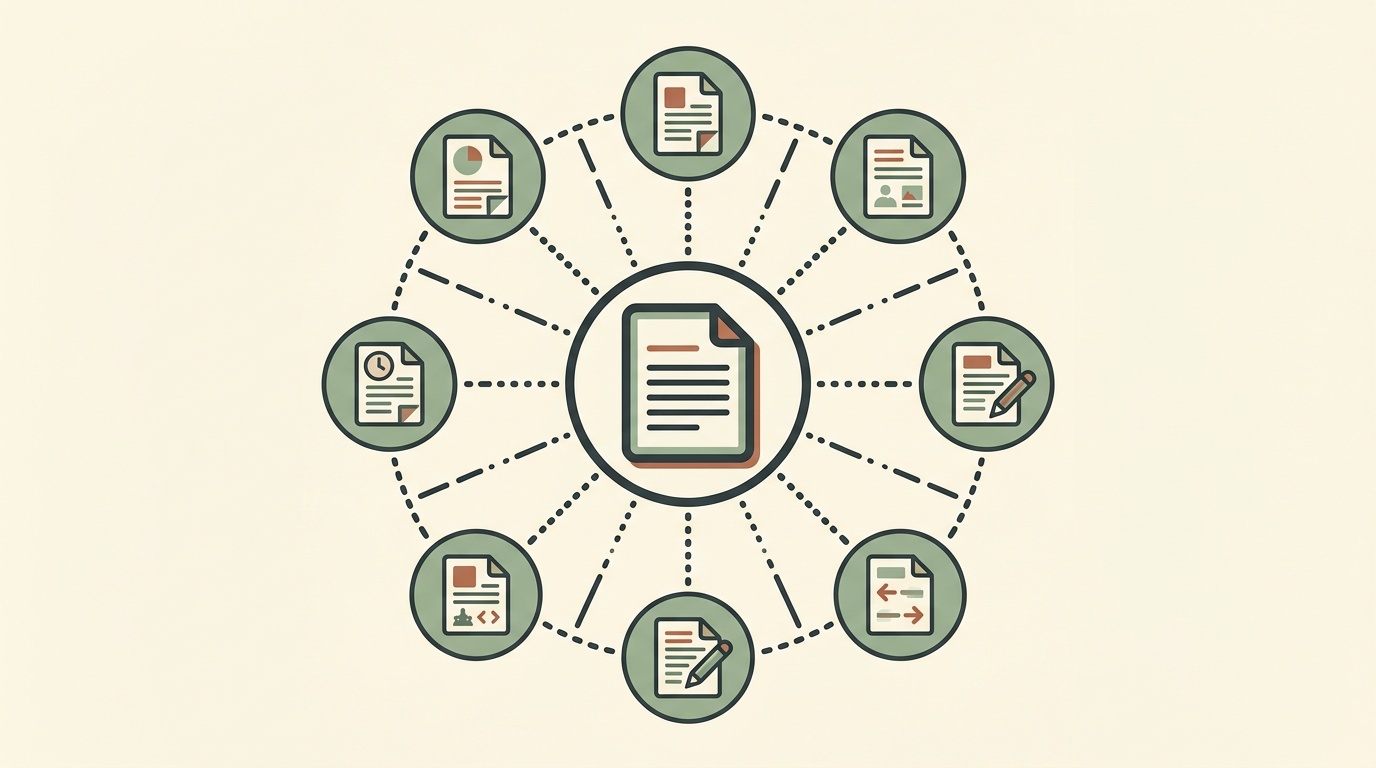
That also explains the term “orphan page”: a page with no internal link pointing to it is rarely indexed by Google, however good it is. The crawler moves through a site by following links. If no link leads to a page, the crawler rarely gets there.
Only dofollow links pass value. A nofollow link tells Google not to follow the reference, so internal links with that attribute distribute nothing.
Sites with fewer than 20 articles start to feel the effect of properly built internal linking after a few months. The change is not instant, but it lasts and it can be measured.
Each page passes only part of its authority to the pages it links to. The more outgoing links a page has, the smaller the share each target page gets. Scattering links everywhere without a plan is a waste, and a common one.
Step by step: building a pillar-cluster structure
The pillar-cluster model is a way to organize your content so it makes sense. One central page covers a broad topic, and around it sit related, smaller articles. Google can then follow how your topics connect and treats the site as an expert source rather than a heap of unrelated texts. Three steps get you there.
- Find a central topic. Pick a broad area, for example “human resources management” or “accounting services for small businesses”. The topic needs to be big enough to hold plenty of related questions.
- Write articles on specific questions. If the topic is “accounting services”, these could be “VAT registration”, “annual financial statement: deadlines”, “social security contributions for the self-employed”. Each article answers one specific question in depth.
- Link the articles to each other. Every supporting article points to the central one, and the central one points back to the supporting articles. It runs both ways. It also helps when the supporting articles link to one another where the topics are close.
Take a central topic like “natural cosmetics for dry skin”. The supporting articles could cover specific ingredients, seasonal care or product reviews. When the links are clear and logical, the site looks more professional, and readers get more out of it.
Anchor text and the optimal number of links per page: how to choose the best option?
Anchor text is the visible part of a link, the part you click. For Google it is a clear signal about what the target page is about. In practice you meet three main types:
- Exact match (for example “accounting services for small businesses”). Use it sparingly, usually only 1-2 times per article, and only for the keywords that matter most.
- Partial match (for example “services for accounting”). The most common type. Ninorai’s rule of thumb: let it slip naturally into the sentence, otherwise it reads forced.
- Navigational or branded (for example “homepage”, “our services”). Good for links to the main sections of the site.
In practice, Ninorai sees that between 2 and 4 internal links per 1000 words usually send a clear signal to search engines without the text looking stuffed with references. Placement matters too. Links in the first 200 words usually carry more weight than links tucked in at the end.
Manual or automated internal linking: which is right for your site?
Internal linking matters a lot for SEO, and still most site owners do not know how to build it properly for their own project. The choice between manual linking, a plugin or an automated solution depends on the size and the needs of the site.
| Criterion | Manual linking | Plugin / tool | AI automated content with built-in linking |
|---|---|---|---|
| Time investment per article | High | Medium | Minimal |
| Consistency of the structure | Depends on the author | Partial | High |
| Technical knowledge required | Low | Medium | Low |
| Scalability as the site grows | Low | Moderate | High |
| Coverage of new articles | Manual | Partial | Automatic |
If your goal is growth and efficiency, automated internal linking is the right choice. The plans at ninorai.com include an integrated system that builds an optimal link structure for every new post on its own.
How to check your internal links with Google Search Console
Search Console, Google’s free tool, is a handy way to run a quick audit of your internal linking. Open the Links section and choose Internal links. You will see which pages receive the most internal references and which ones are not linked at all.
An internal link audit comes down to five steps:
- Find the orphan pages. A page with no internal links pointing to it is the first problem to fix.
- Check page depth. Important information should never sit more than three clicks away from the homepage.
- Vary your anchor texts. If a page is always linked with the same anchor, it looks unnatural.
- Link the pillar pages in both directions. Every article in the cluster should point to the main page.
- Update your older articles. When you publish a new piece, go back and review the internal links to content that already exists.
Too many internal references to one page can drain its authority. Good internal linking depends on spreading the links out evenly. Link analysis belongs in every solid SEO audit.
Frequently asked questions
What is internal linking and why does it matter for the SEO of a small site?
Internal linking means placing links between the pages of one site. For smaller sites this matters even more, because it helps Google discover and index the content, spreads authority between pages and shows the search engine how the pages relate to each other by topic.
How many internal links should each article have?
Usually between two and four links per 1000 words are enough. Fewer than that and the effect is weak, while more starts to feel cluttered.
How do internal links help new articles rank faster?
When a new article gets a link from an already indexed page with high authority, Google finds it faster and crawls it with priority. That speeds up ranking as well.
Which internal linking mistakes hurt SEO rankings?
Pages without a single incoming link, too many links from one page, identical anchor text for different target pages, and links that come only from the navigation with no contextual links inside the content.
How can AI automation manage internal linking instead of manual work?
AI platforms that create and publish content directly on the site can build internal links automatically with every new post. That removes the need for a manual check after each article and keeps the structure consistent even as the site grows. For a business without an SEO team, it is an easy way to start a 7-day test and see the results in practice.